Setting up multi-factor authentication
You will be prompted to choose a verification method. Select either authenticator app or email address.
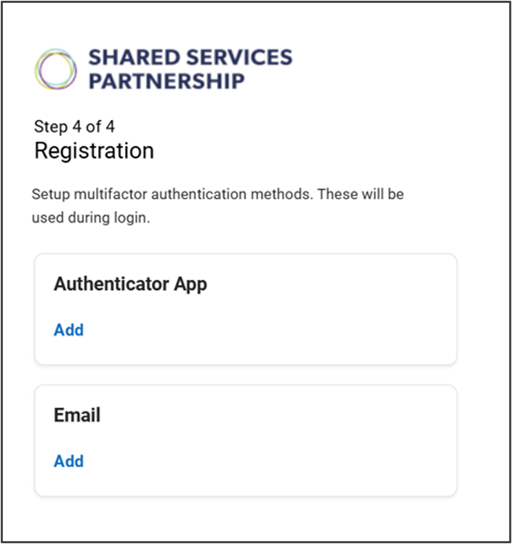
You will be prompted to choose a verification method. Select either authenticator app or email address.
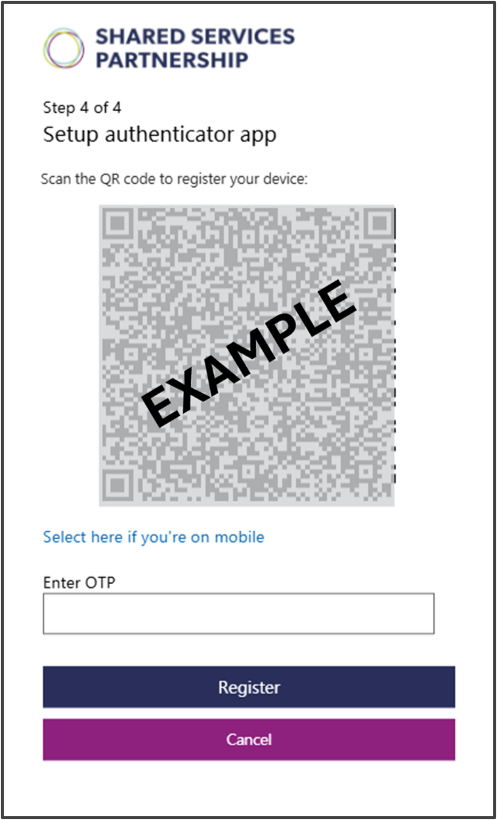
If you don’t already have an authenticator app on your mobile phone, you’ll need to download a free one from the Google Play Store or Apple App Store before registering. We recommend using the Microsoft Authenticator app.
Select Add under Authenticator app. You will be presented with the screen shown below:

If you cannot find the Hants account, save your username and password in the Passwords app and try again.
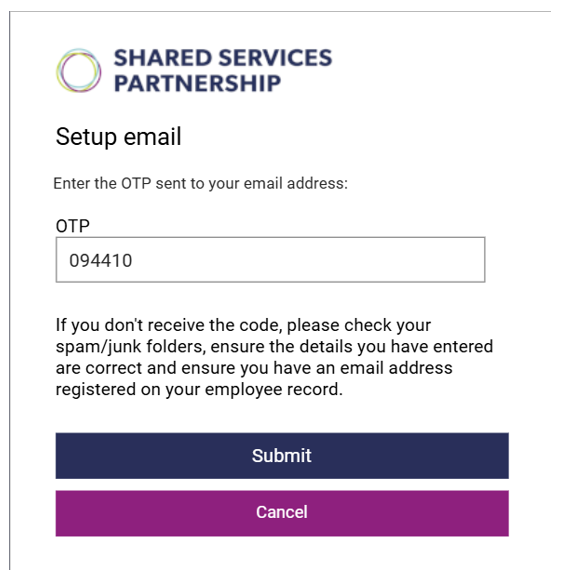
To use your email address as an authentication method, press the Add button underneath email. Any email addresses maintained on your record (work or personal) will be displayed and you will be able to select your preferred one to use. If you only have one email address maintained on your record, it will be displayed as a reminder.
If no email addresses are displayed, or if the email shown is incorrect, you will need to contact your manager. They can update your record on your behalf so that you can select this method of authentication.
Managers can refer to the Manage Personal Email guidance in the portal for further information on how to do this.
The OTP code will be sent to your email address and will need to be entered into the OTP field on the screen. The OTP will time out after 20 minutes – if the OTP has not been used within this time, you will need to start the registration or resetting process again and request a new OTP.
If you do not receive the code to the selected email address, you should check your spam or junk folders.

Once an authentication method has been added to your ESS account, you will receive an email to all email addresses held on your record confirming the change. If the change was not made by you, use the link in the email to contact Shared Services via webchat as soon as possible.
If you wish to change your password or, change, remove, or add an authentication method, you will need to go to Update Details.
Note: You can only remove an authentication method if you have both options set up (authenticator app and email address).
These pages show further details for registering and logging into ESS: